
In order to add UBICast recording links to your module on Blackboard, you will need to follow some simple steps to ensure that your students can see the video.
Firstly, go to the left hand menu in your Blackboard module. Go to Control Panel> Customisation > and click Tool Availability.
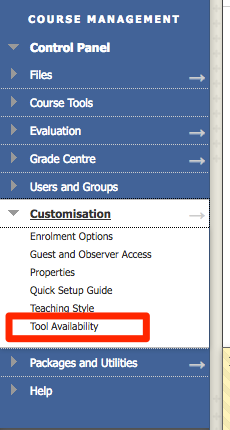
Scroll down the page and make sure Available in content item is checked against LTI Link. Click Submit.

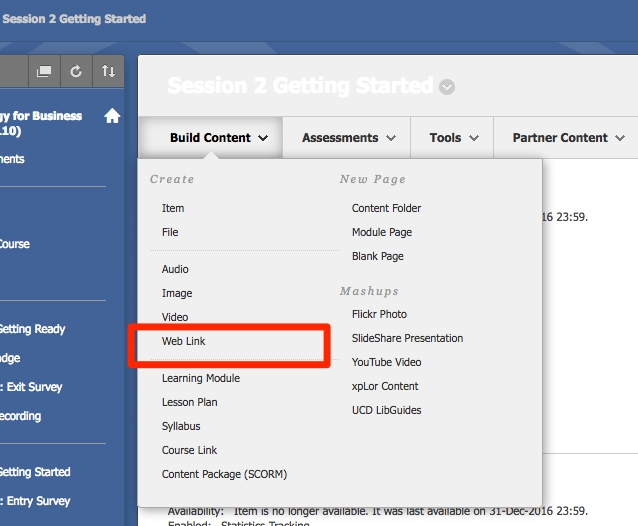
Next, include your link in your module. Go to Build Content and add a Web Link.
Give the link a title, and paste in the LTI link you received from the UBICast system. Make sure the This link is a to a Tool Provider is checked.
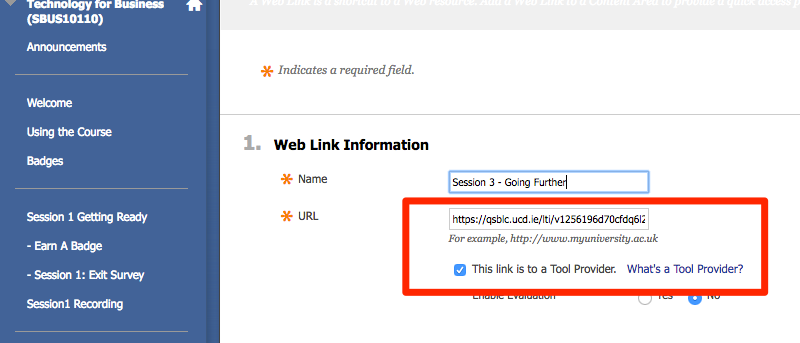
Click submit once you finished, the recording will appear as a normal web link to the student but the link is restricted to only users of the module.